Clip Actions
Add custom actions which are available on annotations. Also see the section on Actions.
Where in the UI
In the Library, the Clip Action will appear on the clip thumbnail, on clip rows, and in the selection toolbar.
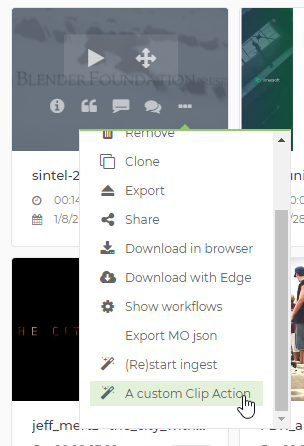
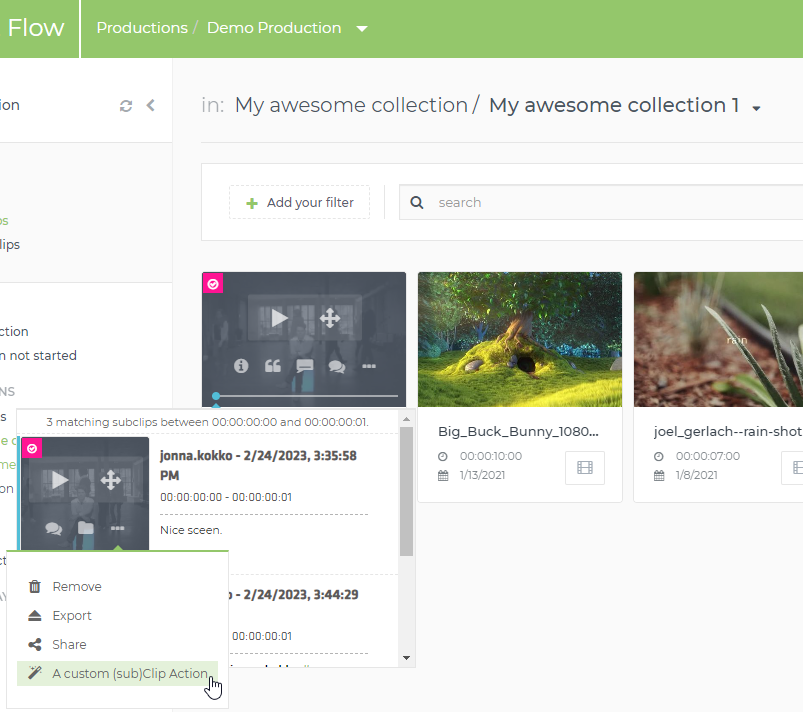
If the filters don’t prevent it, the Clip Action will also appear in the menu of subclips:
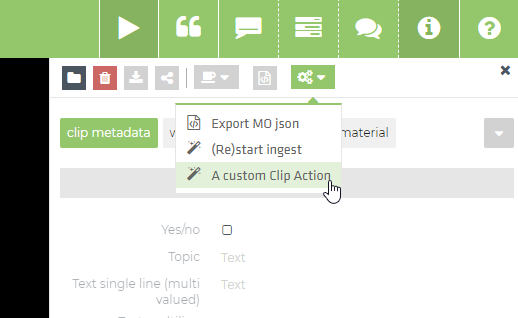
The details screen will also contain a menu containing the Clip Actions:
Example
{
 "clipActions": [
    {
      "label": "Test clip command",
      "icon": "icon-magic",
      "requiredRights": "LIBRARY_SHARE",
      "clientCommand": "TheClientCommand",
      "params": {
        "paramToClientCommand": "value",
        "oneWorkflowPerItem": true
      },
      "filters": [
        {
          "key": "annotation.funnel",
          "values": [
            "MediaObjectAnnotation"
          ]
        }
      ]
    }
  ]
}
The oneWorkflowPerItem param indicates if one workflow should
start per clip, or if one workflow should start for the selection.
In the latter case,
a production/service is started with a moIds array parameter
containing the MediaObject ids.
funnel filter
Note that the actions appear on any selection, also if only subclips are selected in the list view. So you might want to add a funnel filter
{
    "filters": [
        {
            "key": "annotation.funnel",
            "values": ["MediaObjectAnnotation"]
        },
    ]
}
clientCommand
GenericClipCommandUserParams
Renders a dialog which can ask for user input, then it starts a workflow
per MediaObject in the selection (use
params.oneWorkflowPerItem = false to start one bulk workflow
for the selection).
The syntax for params is identical to
GenericEditorialObjectServiceWithDialog which is explained above.
{
  "clipActions": [{
    "label": "Test clip command",
    "icon": "icon-magic",
    "clientCommand": "GenericClipCommandUserParams",
    "requiredRights": "LIBRARY_SHARE",
    "params": {
      "infoMessage": "This will start the command for all selected clips",
      "service": "KAREL_ECHO",
      "formFieldsDefinition": {
        "name": {
          "label": "The Name",
          "type": "STRING",
          "allowList": [{ "value": "barbapapa"}, {"value": "barbamama" }],
          "skipWhiteListValidation": true,
          "defaultValue": { "value": "barbapapa" },
          "userProperties": {
              "parameterName": "workflowParameters.user_name",
          }
        },
        "due": {
          "type": "DATE",
          "userProperties": {
            "parameterName": "workflowParameters.when_is_due"
          }
        }
      }
    },
    "filters": [
      {
        "key": "annotation.funnel",
        "values": [
          "MediaObjectAnnotation"
        ]
      }
    ]
  }]
}
GenericAnnotationCommandUserParams
Syntax and usage are similar to
GenericClipCommandUserParams, but this will start a workflow
per Annotation (vs per MediaObject). This is suited for workflows
working on e.g. subclips.
{
  "clipActions": [{
    "label": "Test annotation command",
    "icon": "icon-magic",
    "clientCommand": "GenericAnnotationCommandUserParams",
    "params": {
      "infoMessage": "This will start the command for all selected annotations",
      "service": "ANNOTATION_ECHO",
      "oneWorkflowPerItem": false,
      "formFieldsDefinition": {
          "due": {
              "name": "due",
              "type": "DATE",
              "userProperties": {
                   "parameterName": "workflowParameters.when_is_due"
              }
          }
      }
    },
    "filters": [
      {
        "key": "annotation.funnel",
        "values": [
          "ClipAnnotation"
        ]
      }
    ]
  }]
}
ExternalLink
This replaces the deprecated libraryAdditionalSelectionActions setting,
and allows adding hyperlinks to the interface.
It can be used as in productionActions or in clipActions.
{
  "clientCommand": "ExternalLink",
  "icon": "icon-magic",
  "label": "Go to limecraft",
  "params": {
    href: "https://www.limecraft.com",
    target: "_blank"
  }
}
The href can contain some special values which will be replaced:
-
PROD_ID- Will be replaced with the production id -
MO_IDS- Where possible, will be replaced with the MediaObject ids, comma-separated. -
AN_IDS- Where possible, will be replaced with the Annotation ids, comma-separated. -
MOA_IDS- Where possible, will be replaced with the MediaObjectAnnotation ids, comma-separated.