Authentication
This section explains the basic calls you need to authenticate against the platform.
This will be done using the provided user credentials, which are used to see which productions the user has access to.
Base Url
This documentation does not list the full url for API calls. The paths listed for API calls need to be preceded with the base url. This is the address of the environment you will be using for connecting to the API.
In most cases this will be https://platform.limecraft.com/api/.
Login
| The following assumes the user is not configured to use SAML 2.0-based authentication. Information about API-based SAML 2.0 authentication will be added in a future version of this documentation. |
Log in with your username (or email address) and password from Limecraft Flow,
and retrieve an access token. It is this access token that must be used for accessing the API with each subsequent call. As such, the login call is only used once per session.
You can set rememberMe to true to remember the user for one week and keep their session active during that time.
Get Access Token
POST /authentication/loginThis call will authenticate the user on the platform.
Details
Description
Provided the correct username and password, it returns the token that is to be used with all proceeding calls.
Parameters
Form Parameters
| Name | Description | Required | Type |
|---|---|---|---|
|
The password for login |
✔ |
String |
|
For saml based authentication. Url to redirect to if the Saml authentication fails. Usually https://platform.limecraft.com/#auth/error/ |
✘ |
String |
|
For saml based authentication. After successful authentication, the browser will be redirected to redirectIfOk location. |
✘ |
String |
|
The user will be redirected to the `redirectIfPassword` location if no password is provided |
✘ |
String |
|
For saml based authentication. |
✘ |
String |
|
If `rememberMe` is set, the token generated with this call is has a timeout of 1 week instead of 1 hour. |
✘ |
Boolean |
|
The username or email for login |
✔ |
String |
Return Type
Object
Content Type
-
application/json
Responses
| Code | Description | Datatype |
|---|---|---|
200 |
The request was successful. |
|
401 |
The account is unauthorized or disabled. |
|
403 |
The account is locked. |
|
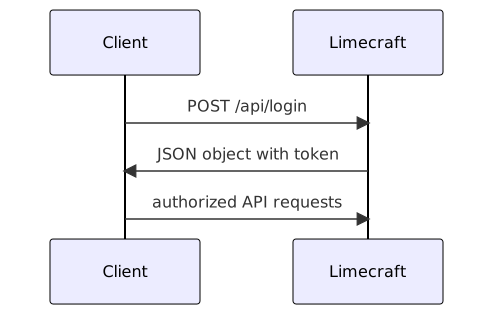
The body of the request can be either form parameters, but an 'application/json' request with a json body is also accepted:
{
    "username": "john.doe",
    "password": "mysecret123!"
}
In case of wrong credentials provided, you can expect the following response:
{
    "type": "UnauthorizedError",
    "code": 401,
    "errorNumber": 0,
    "message": "wrongUsername was not authorized, the username / password combination you entered is invalid.",
    "data": null
}
However, if you provide the correct username/password combination, the response is
{
    "needsSecondToken":false,
    "status":200,
    "token":"THE_TOKEN"
}
This call returns a JSON object with a token field: {"token": "THE_TOKEN"}.
This token is used as authentication for accessing the REST API, and should be used in all subsequent calls in one of the following methods:
-
Either in the Authorization header:
Authorization: Bearer THE_TOKEN -
Either as a query parameter:
?access_token=THE_TOKEN -
Either as a cookie:
MOJITO_SESSION_ID_V2=THE_TOKEN
Two-factor Authentication
When two-factor authentication is enabled, an additional authentication step is required. To enable it, on a user level, you can use this call
POST /user/{id}/enable2faThis API call enables the user to use two-factor technique for authenticating.
Details
Description
Parameters
Path Parameters
| Name | Description | Required | Type |
|---|---|---|---|
|
ID of the production. |
✔ |
String |
Body Parameters
| Name | Description | Required | Type |
|---|---|---|---|
|
Body of the request. |
✘ |
TwoFactorAuthenticationEnableRequest |
TwoFactorAuthenticationEnableRequest
| Field Name | Required | Type | Description | Format |
|---|---|---|---|---|
password |
✘ |
String |
||
redo |
✘ |
Boolean |
Run again, even if the workflow already ran in this context. |
|
redoSingleTask |
✘ |
Boolean |
||
skipActiveWorkflowTest |
✘ |
Boolean |
||
token |
✘ |
String |
||
type |
✘ |
String |
Enum: PASSWORD, SAML, TWO_FA_EMAIL, TWO_FA_AUTHENTICATOR, TWO_FA_AUTHENTICATOR_ENABLING, TWO_FA_AUTHENTICATOR_DISABLING, |
|
waitForWorkflow |
✘ |
Boolean |
||
workflowLabel |
✘ |
String |
Return Type
TwoFactorAuthenticationResponse
| Field Name | Required | Type | Description | Format |
|---|---|---|---|---|
digits |
✘ |
Integer |
int32 |
|
hashingAlgorithm |
✘ |
String |
||
key |
✘ |
String |
||
period |
✘ |
Integer |
int32 |
|
qr |
✘ |
String |
Content Type
-
application/json
Responses
| Code | Description | Datatype |
|---|---|---|
200 |
The request was successful. |
|
403 |
The user can only request his own invitations or needs SUPPORT rights. |
|
404 |
The user was not found. |
|
Two-factor authentication is a verification process which follows the well known principle of something the user knows and something the user has.
Users provide an extra verification token during authentication — a one-time password verification code based on the Time-based One-Time Password TOTP algorithm.
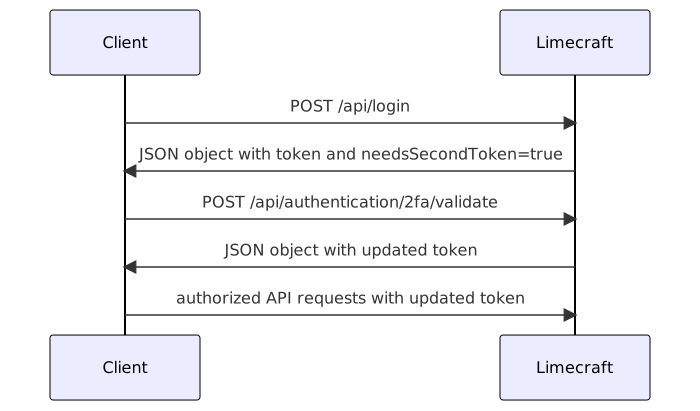
The first part of the authentication process remains the same as above.
A token object is received, but instead of only getting the token an
additional needsSecondToken property is provided, indicating
that further authentication is required.
The client must generate the one-time password verification code, and
pass it to the authentication token validation API call (see below), while at the same time authenticating that call with the access token received from the initial login call (either using the Bearer Authentication header or using the query
string access_token).
| 2FA depends on clocks being properly synced. If the user has a machine of which the clock is out of sync, their 2FA codes will not match and login will fail. They must sync their clock. |
Generating the one-time password verification code
When enabling two-factor authentication for a particular, the API will return the following data:
{
  "key": "ABCDEFGHIJKLM",
  "qr": "data:image/png;base64,iVBORw0KGgoAAAANSUhEUgAAAV4AAAFeAQAAAADlUEq3AAAEGklEQVR4Xu2aS46jQBBEE3nB0kfgJvbFkNySL4ZvwhFY1sJyTbwoZprGrVFvs0VKRkBFIZHfyMRRfy7P2N/5jxzgrRzgrRzgrRzgrRzgrRzgrSQGTxHRv84+u9WI80fEtX4M5bpwGTEkBz/06x/1OZSIUy2dLsslxujrcqq9YOnBSwxauM092ihxfkawQ7h71b3xV4Cnc53rS+BaMTLm1uU4/Brw63yvWj3NOLD9ObRw+14b2cD6SRt3LC2V4NkK3VNTzps/JwRPevv+sci03xxQTXZwk2Xk6j4rVp/a61jFBf5KYrC0oZe2P6uwFN5f/vwM1ZQxymXdkRjsE/nurFUZXntVTlpGklNP5y/+nBHsxMNCb5uv/GBsKumpM8nBEuUhMQC0geGlCJUYktF6lhz8ggYE5r6I9lg5wbZWPu3oucHc0yHswFWJlgwMcWXvW8BmBEukDRGCTuQuLrYviuhw73ffSAfGvuVKEUEbBfvayKVjxwX3zg12R9XJyPJiR61ykzgradis4GZUYjAMQB2V2ZzMDWdFB1GMw7OTg6mXjlAxnvvsCHWs9kK8aSMjeMKLOzLSg4Cl/TdHL6jEDC852In2ZYpjFi5/jku4Yz7NhZFAcrDIDooYKSLWxhPDi7hic/SSHUyj2JIRrixFrDogLQ1uLZODX6oaykj0+3Xtk10+C3oprYbmBkeT4bO3YnEgI4W27Zw/H5gBDqWDbtGUDh6LIvyAt94qH5iAbXSVMyVfeXE1SVCdYTZnyQxeCUGbLMIPoKvN3Khpx8zzgVGExL3VjQTVFAGvawvpwSI79meXTyejIEHJvc1o04MnGABv3ruDVPkMF5b+RdRejckNbhyuNu7TKidFU9oYMfyXjJQRLIHIsbB45lYppApYlZjZ27KDSbTh+uG0pCoJPeee+BDVJT34RjusjNQ5vcrIxOosS0MS9gUoH3gCZ23QW9mf145Kubi1zbnBDzdTZ11xRujqwOdg/LnR89xgZ9YOQrAmI1lft1svWfYsNyX4TpjenHxbRxWMFyWjXSA7eKJ+YGRuDZXP+OHhN3QBfsC91OB/2sCBZXi8GBfgAaLsX8ydEcw3UhKPe6uBbY7foZKGXV2Sg6fPSRtdVpsGLEyoCOLr+sDEYL10dY71TL+4crK3MIcrO21kBDtCWYAaEL+yueenIN5oT0pwdVqaq6emeLbBbRCw+1NNRrBen8/aJ761jQ3SuzHG+iwYlRjsyaJLJa2+J1Q61Bm8iuaO12UEk33MWcm29mf65CBgv50x5gQz33Bv5VilkBaUE3C9XwFe/G+M6tCl8w/8WTsctcnB+sFu5jYwxbPtz2xrrVZysBw48GdwdItutThjTOUWOTn4Z3KAt3KAt3KAt3KAt3KAt3KAt3KAt/L8A3ZjjbxHGwxfAAAAAElFTkSuQmCC",
  "hashingAlgorithm": "SHA512",
  "digits":  6,
  "period":  30
}
Using this information, the one-time password verification code can be generated. For example using this library.
const code = totp('ABCDEFGHIJKLM', {digits: 6, algorithm: 'SHA-1', period: 30})The QR code can be used to configure authenticator apps such as Google Authenticator, 1Pass, Authy, and others.
Validating the 2FA token
The generated TOTP token is validated against the API with the /authentication/2fa/validate call in order to obtain a final access token that can be used for subsequent API access. The temporary access token obtained from the first-stage /authentication/login is used to provide the proper context.
The TokenAuthenticationRequest body is a JSON object in which the token is provided as follows:
{
  "rememberMe": true,
  "token": "123456"
}
POST /authentication/2fa/validate__
Details
Description
Parameters
Body Parameters
| Name | Description | Required | Type |
|---|---|---|---|
|
✘ |
TokenAuthenticationRequest |
TokenAuthenticationRequest
| Field Name | Required | Type | Description | Format |
|---|---|---|---|---|
rememberMe |
✘ |
Boolean |
||
token |
✘ |
String |
Return Type
RestToken
| Field Name | Required | Type | Description | Format |
|---|---|---|---|---|
message |
✘ |
String |
||
needsSecondToken |
✘ |
Boolean |
||
status |
✘ |
Integer |
int32 |
|
token |
✘ |
String |
Content Type
-
application/json
Responses
| Code | Description | Datatype |
|---|---|---|
0 |
default response |
|
Validate Token
Access tokens can be validated at any time with the following API call. The response is a User object, of which the most important properties are id, username and email.
GET /authentication/user__
Details
Description
Parameters
✘
Return Type
User
| Field Name | Required | Type | Description | Format |
|---|---|---|---|---|
aboutMe |
✘ |
String |
||
accountRoles |
✘ |
Set of AccountRole |
||
accounts |
✘ |
Set of Account |
||
activated |
✘ |
Date |
date-time |
|
addressLine1 |
✘ |
String |
||
addressLine2 |
✘ |
String |
||
city |
✘ |
String |
||
country |
✘ |
String |
||
county |
✘ |
String |
||
created |
✘ |
Date |
The time when this resource was created |
date-time |
createdBy |
✘ |
String |
The request or process that created this resource |
|
deleted |
✘ |
Date |
date-time |
|
✔ |
String |
|||
emailHash |
✘ |
String |
||
firstName |
✘ |
String |
||
fixedLinePhone |
✘ |
String |
||
focus |
✘ |
String |
||
fullName |
✘ |
String |
||
hasAvatar |
✘ |
Boolean |
||
id |
✔ |
Long |
The id of this resource |
int64 |
identityProvider |
✘ |
String |
||
lastIndexCompleted |
✘ |
Date |
date-time |
|
lastIndexed |
✘ |
Date |
date-time |
|
lastName |
✘ |
String |
||
lastSeen |
✘ |
Date |
date-time |
|
lastUpdated |
✘ |
Date |
The time when this resource was last updated |
date-time |
lockedForApproval |
✘ |
Date |
date-time |
|
lockedForReading |
✘ |
Date |
date-time |
|
lockedForWriting |
✘ |
Date |
date-time |
|
mobile |
✘ |
String |
||
modifiedBy |
✔ |
String |
The request or process responsible for the last update of this resource |
|
nameId |
✘ |
String |
||
notificationSettings |
✘ |
NotificationSettings |
||
objectType |
✘ |
String |
The data model type or class name of this resource |
|
passwordResetTokenTime |
✘ |
Date |
date-time |
|
refs |
✘ |
String |
||
roles |
✘ |
Set of Role |
||
suprSendId |
✘ |
String |
||
type |
✘ |
String |
Enum: REGISTERED, SHARED, UNREGISTERED, ANONYMOUS, |
|
username |
✔ |
String |
The username of the user, must be unique |
|
version |
✔ |
Long |
The version of this resource, used for Optimistic Locking |
int64 |
zipCode |
✘ |
String |
Content Type
-
application/json
Responses
| Code | Description | Datatype |
|---|---|---|
200 |
User is logged in. |
|
Logout
User sessions can be logged out explicitly with the /authentication/logout call. If this call is not used, user sessions will time out eventually. However, it is best practice to log out users after a session or logical set of API interactions ends from the integration’s point of view, both for scalability reasons and to minimize security attack surfaces due to lingering user sessions.
The /authentication/logout can log out all active sessions associated with a single user. For this to happen, set the allSessions field of the LogoutRequest to true. This functionality can be useful to revoke user access centrally and across the entire platform.
|
POST /authentication/logout__
Details
Description
Parameters
Body Parameters
| Name | Description | Required | Type |
|---|---|---|---|
|
✘ |
LogoutRequest |
LogoutRequest
| Field Name | Required | Type | Description | Format |
|---|---|---|---|---|
allSessions |
✘ |
Boolean |
||
redirectIfFailed |
✘ |
String |
||
redirectIfOk |
✘ |
String |
||
redirectIfSaml |
✘ |
String |
Return Type
✘
Responses
| Code | Description | Datatype |
|---|---|---|
200 |
User has logged-out |
`` |