Annotations
Most of the metadata of a MediaObject (or part of a MediaObject) will be stored in Annotations. You can learn more about the various annotations here.
Annotations are used both to store clip-level metadata (in the MediaObjectAnnotation), but also to store things like the transcript of a certain range (TranscriptAnnotation), the subtitles in a particular language (Subtitle), subclips and comments (ClipAnnotation) etc.
MediaObjectAnnotation: Clip-level metadata
The most important Annotation of a clip is the MediaObjectAnnotation. This is the only annotation which is created automatically as soon as a MediaObject is created / uploaded. You can assume it is always available on your clip.
It can be retrieved with this call
GET /production/{prId}/mo/{moId}/moaThis call will retrieve all current metadata for the given clip.
Details
Description
Parameters
Path Parameters
| Name | Description | Required | Type |
|---|---|---|---|
|
ID of the production. |
✔ |
Long |
|
ID of the media object. |
✔ |
Long |
Query Parameters
| Name | Description | Required | Type |
|---|---|---|---|
|
Optional inclusion of MediaObject. |
✘ |
Boolean |
|
Optional inclusion of MediaObject workflow types. |
✘ |
List of String |
|
Optional inclusion of MediaObject instance types. |
✘ |
List of String |
|
Optional inclusion of translated id-s. |
✘ |
Boolean |
Return Type
MediaObjectAnnotation
| Field Name | Required | Type | Description | Format |
|---|---|---|---|---|
annotationProductionId |
✘ |
Long |
int64 |
|
circled |
✘ |
Boolean |
||
clipMetadata |
✘ |
ClipMetadata |
||
created |
✘ |
Date |
The time when this resource was created |
date-time |
createdBy |
✘ |
String |
The request or process that created this resource |
|
createdByShareId |
✘ |
Long |
int64 |
|
createdBySharedUserId |
✘ |
Long |
int64 |
|
creatorId |
✘ |
Long |
The id of the user who created this resource |
int64 |
crossProduction |
✘ |
Boolean |
||
customFields |
✘ |
CustomFields |
||
deleted |
✘ |
Date |
date-time |
|
description |
✘ |
String |
Textual contents of the Annotation |
|
end |
✘ |
Long |
The frame range described by the annotation runs up to end, but not including it. Should be less than or equal to the amount of frames the MediaObject has. |
int64 |
funnel |
✘ |
String |
Describes how the Annotation should be interpreted by the client application. Can be thought of as a subtype. |
|
genericType |
✘ |
String |
||
hasScreenshot |
✘ |
Boolean |
||
id |
✔ |
Long |
The id of this resource |
int64 |
includeTranslatedTo |
✘ |
Boolean |
||
includesFrom |
✘ |
Set of string |
||
keyframeFrames |
✘ |
Long |
int64 |
|
label |
✘ |
String |
||
language |
✘ |
String |
||
lastUpdated |
✘ |
Date |
The time when this resource was last updated |
date-time |
loggingStatus |
✘ |
String |
Enum: NOT_STARTED, EDITING, COMPLETED, |
|
mediaObject |
✘ |
MediaObject |
||
mediaObjectId |
✘ |
Long |
int64 |
|
modifiedBy |
✔ |
String |
The request or process responsible for the last update of this resource |
|
nonPreferred |
✘ |
Boolean |
||
objectType |
✘ |
String |
The data model type or class name of this resource |
|
origin |
✘ |
String |
||
productionId |
✘ |
Long |
int64 |
|
rating |
✘ |
Double |
double |
|
relatedToId |
✘ |
Long |
int64 |
|
reviewStatus |
✘ |
String |
||
screenshotMimeType |
✘ |
String |
||
securityClasses |
✘ |
Set of string |
Enum: |
|
shotInformation |
✘ |
Shots |
||
source |
✘ |
String |
||
spatial |
✘ |
String |
Link the Annotation to a specific part of the video or image frame. A Media Fragments Spatial Dimension description string is expected. |
|
start |
✘ |
Long |
First frame of the Annotation. 0 is the first frame of the clip. The start frame is included in the frame range the annotation describes. |
int64 |
structuredDescription |
✘ |
Object |
||
subtitlingStatus |
✘ |
String |
Enum: NOT_STARTED, EDITING, COMPLETED, AUTOMATIC_STARTED, AUTOMATIC_COMPLETED, AUTOMATIC_FAILED, |
|
subtitlingStatuses |
✘ |
SubtitlingStatusMap |
||
systemFields |
✘ |
CustomFields |
||
tags |
✘ |
Set of string |
||
tinyThumb |
✘ |
List of ByteArray |
byte |
|
transcriptionStatus |
✘ |
String |
Enum: NOT_STARTED, EDITING, COMPLETED, AUTOMATIC_STARTED, AUTOMATIC_COMPLETED, AUTOMATIC_FAILED, |
|
transcriptionStatuses |
✘ |
TranscriptionStatusMap |
||
translatedFromId |
✘ |
Long |
int64 |
|
translatedToIds |
✘ |
Set of long |
int64 |
|
type |
✘ |
String |
Enum: MINIME, EBU_CORE, TRANSCRIBER, TECHNICAL_DETAILS, GENERIC, SUBTITLE, SHOT, AI_DETECTOR_RESULT, |
|
version |
✔ |
Long |
The version of this resource, used for Optimistic Locking |
int64 |
Content Type
-
application/json
Responses
| Code | Description | Datatype |
|---|---|---|
200 |
The request was successful. |
|
403 |
User needs PRODUCTION_VIEW rights or VIEW rights on the MediaObject. |
|
404 |
The production or MediaObject was not found. |
|
The response of this call will be the MediaObjectAnnotation with fields like description, tags and many more.
Changes to the MediaObjectAnnotation are done using a JSON PATCH to
PATCH /production/{prId}/mo/{moId}/moaThis call will update (patch) the metadata for the given clip.
Details
Description
Parameters
Path Parameters
| Name | Description | Required | Type |
|---|---|---|---|
|
ID of the production. |
✔ |
Long |
|
ID of the MediaObject. |
✔ |
Long |
Body Parameters
| Name | Description | Required | Type |
|---|---|---|---|
|
The patch object. |
✔ |
GenericJson |
GenericJson
Base class for all JSON nodes, which form the basis of JSON Tree Model that Jackson implements.
| Field Name | Required | Type | Description | Format |
|---|---|---|---|---|
id |
✘ |
Integer |
int32 |
Return Type
MediaObjectAnnotation
| Field Name | Required | Type | Description | Format |
|---|---|---|---|---|
annotationProductionId |
✘ |
Long |
int64 |
|
circled |
✘ |
Boolean |
||
clipMetadata |
✘ |
ClipMetadata |
||
created |
✘ |
Date |
The time when this resource was created |
date-time |
createdBy |
✘ |
String |
The request or process that created this resource |
|
createdByShareId |
✘ |
Long |
int64 |
|
createdBySharedUserId |
✘ |
Long |
int64 |
|
creatorId |
✘ |
Long |
The id of the user who created this resource |
int64 |
crossProduction |
✘ |
Boolean |
||
customFields |
✘ |
CustomFields |
||
deleted |
✘ |
Date |
date-time |
|
description |
✘ |
String |
Textual contents of the Annotation |
|
end |
✘ |
Long |
The frame range described by the annotation runs up to end, but not including it. Should be less than or equal to the amount of frames the MediaObject has. |
int64 |
funnel |
✘ |
String |
Describes how the Annotation should be interpreted by the client application. Can be thought of as a subtype. |
|
genericType |
✘ |
String |
||
hasScreenshot |
✘ |
Boolean |
||
id |
✔ |
Long |
The id of this resource |
int64 |
includeTranslatedTo |
✘ |
Boolean |
||
includesFrom |
✘ |
Set of string |
||
keyframeFrames |
✘ |
Long |
int64 |
|
label |
✘ |
String |
||
language |
✘ |
String |
||
lastUpdated |
✘ |
Date |
The time when this resource was last updated |
date-time |
loggingStatus |
✘ |
String |
Enum: NOT_STARTED, EDITING, COMPLETED, |
|
mediaObject |
✘ |
MediaObject |
||
mediaObjectId |
✘ |
Long |
int64 |
|
modifiedBy |
✔ |
String |
The request or process responsible for the last update of this resource |
|
nonPreferred |
✘ |
Boolean |
||
objectType |
✘ |
String |
The data model type or class name of this resource |
|
origin |
✘ |
String |
||
productionId |
✘ |
Long |
int64 |
|
rating |
✘ |
Double |
double |
|
relatedToId |
✘ |
Long |
int64 |
|
reviewStatus |
✘ |
String |
||
screenshotMimeType |
✘ |
String |
||
securityClasses |
✘ |
Set of string |
Enum: |
|
shotInformation |
✘ |
Shots |
||
source |
✘ |
String |
||
spatial |
✘ |
String |
Link the Annotation to a specific part of the video or image frame. A Media Fragments Spatial Dimension description string is expected. |
|
start |
✘ |
Long |
First frame of the Annotation. 0 is the first frame of the clip. The start frame is included in the frame range the annotation describes. |
int64 |
structuredDescription |
✘ |
Object |
||
subtitlingStatus |
✘ |
String |
Enum: NOT_STARTED, EDITING, COMPLETED, AUTOMATIC_STARTED, AUTOMATIC_COMPLETED, AUTOMATIC_FAILED, |
|
subtitlingStatuses |
✘ |
SubtitlingStatusMap |
||
systemFields |
✘ |
CustomFields |
||
tags |
✘ |
Set of string |
||
tinyThumb |
✘ |
List of ByteArray |
byte |
|
transcriptionStatus |
✘ |
String |
Enum: NOT_STARTED, EDITING, COMPLETED, AUTOMATIC_STARTED, AUTOMATIC_COMPLETED, AUTOMATIC_FAILED, |
|
transcriptionStatuses |
✘ |
TranscriptionStatusMap |
||
translatedFromId |
✘ |
Long |
int64 |
|
translatedToIds |
✘ |
Set of long |
int64 |
|
type |
✘ |
String |
Enum: MINIME, EBU_CORE, TRANSCRIBER, TECHNICAL_DETAILS, GENERIC, SUBTITLE, SHOT, AI_DETECTOR_RESULT, |
|
version |
✔ |
Long |
The version of this resource, used for Optimistic Locking |
int64 |
Content Type
-
application/json
Responses
| Code | Description | Datatype |
|---|---|---|
200 |
The update was successful. |
|
403 |
User needs LIBRARY_UPDATE_METADATA rights or MANAGE rights on the MediaObject. |
|
404 |
The production or MediaObject was not found. |
|
409 |
The version in the update object does not match with the version stored causing an optimistic lock. |
|
422 |
The annotation does not validate to the annotation restrictions. For example annotation.start > annotation.end. |
|
If the built-in fields are not enough, it is also possible to define your own via custom fields. Learn more about it on this page.
Retrieve annotations
Endpoints for retrieving annotations
Retrieve annotations of a MediaObject
To get a list of the Annotations of a MediaObject, use this call:
GET /production/{prId}/mo/{moId}/an/queryQuery for production annotations.
Details
Description
Parameters
Path Parameters
| Name | Description | Required | Type |
|---|---|---|---|
|
ID of the production. |
✔ |
Long |
|
ID of the mediaObject. |
✔ |
Long |
Return Type
AnnotationSolrDocumentList
| Field Name | Required | Type | Description | Format |
|---|---|---|---|---|
elapsedTime |
✘ |
Long |
int64 |
|
facetDates |
✘ |
List of FacetField |
||
facetFields |
✘ |
List of IFacetField |
||
facetPivot |
✘ |
Map of object |
||
facetQuery |
✘ |
Map of integer |
int32 |
|
facetRanges |
✘ |
List of object |
||
fieldStatsInfo |
✘ |
Map of IFieldStatsInfo |
||
groupResponse |
✘ |
GroupResponse |
||
highlighting |
✘ |
Map of map |
||
items |
✘ |
List of Component |
||
mediaObjectProperties |
✘ |
Map of map |
||
numFound |
✘ |
Long |
int64 |
|
responseHeader |
✘ |
Map of object |
||
results |
✘ |
List of SolrDocument |
||
start |
✘ |
Long |
int64 |
|
termsResponse |
✘ |
TermsResponse |
Content Type
-
application/json
Responses
| Code | Description | Datatype |
|---|---|---|
200 |
The search request was successful. |
|
403 |
The user needs DEVOPS rights. |
|
404 |
The production was not found. |
|
It is important to note that the call uses paging, so multiple calls using offset and limit might be needed to get all the annotations. Learn more here.
This call implements the Query interface, so the fq filter query parameter can be used to filter the Annotations. For example, to only request the Annotations which have the value MediaObjectAnnotation for the funnel field:
GET /production/{{prId}}/mo/{{moId}}/an/query?limit=10&fq=funnel:MediaObjectAnnotationOther fields of Annotations can be used in a fq filter query in a similar manner.
As another example, this call can be used to retrieve the TranscriptAnnotations in a particular language: learn more here.
Retrieve indexed annotations of a MediaObject (search interface)
It is also possible to retrieve annotations from the search index.
GET /production/{prId}/mo/{moId}/anList all available subclips on a clip.
Details
Description
Returns the search result. You can add .srt, .webvtt, .json, .stl or .ebuttd as extension to receive a different serialization format. This call makes use of Solr query parameters. For more info on those, checkout Solr Query parameters .
Parameters
Path Parameters
| Name | Description | Required | Type |
|---|---|---|---|
|
ID of the production. |
✔ |
Long |
|
ID of the mediaObject. |
✔ |
Long |
Query Parameters
| Name | Description | Required | Type |
|---|---|---|---|
|
Compressed result or not. |
✘ |
Boolean |
Return Type
AnnotationSolrDocumentList
| Field Name | Required | Type | Description | Format |
|---|---|---|---|---|
elapsedTime |
✘ |
Long |
int64 |
|
facetDates |
✘ |
List of FacetField |
||
facetFields |
✘ |
List of IFacetField |
||
facetPivot |
✘ |
Map of object |
||
facetQuery |
✘ |
Map of integer |
int32 |
|
facetRanges |
✘ |
List of object |
||
fieldStatsInfo |
✘ |
Map of IFieldStatsInfo |
||
groupResponse |
✘ |
GroupResponse |
||
highlighting |
✘ |
Map of map |
||
items |
✘ |
List of Component |
||
mediaObjectProperties |
✘ |
Map of map |
||
numFound |
✘ |
Long |
int64 |
|
responseHeader |
✘ |
Map of object |
||
results |
✘ |
List of SolrDocument |
||
start |
✘ |
Long |
int64 |
|
termsResponse |
✘ |
TermsResponse |
Content Type
-
application/json
Responses
| Code | Description | Datatype |
|---|---|---|
200 |
The request was successful. |
|
403 |
The user needs PRODUCTION_VIEW rights. |
|
404 |
The production or media object was not found. |
|
A reason to use the search index call is that it supports more powerful search. It implements the Search interface.
Note that the response of the call will not be a list of Annotations, but rather an object containing a results key which is a list of IndexedAnnotations. You’ll notice that each such IndexedAnnotation contains information from the Annotation, but also from the MediaObject, information on the EditorialObjects it is attached to and more. All this information can also be used to filter the results.
It is important to note that using this call comes with a drawback. There can be a delay (a few seconds) for changes to Annotations (create, update, delete) to become visible in the search index.
Retrieve annotations of a Production
The following call works similar to Retrieve annotations of a MediaObject, but will return all annotations (the user is allowed to see) of all clips in a production:
GET /production/{prId}/an/queryQuery for production annotations.
Details
Description
Parameters
Path Parameters
| Name | Description | Required | Type |
|---|---|---|---|
|
ID of the production. |
✔ |
Long |
Return Type
AnnotationSolrDocumentList
| Field Name | Required | Type | Description | Format |
|---|---|---|---|---|
elapsedTime |
✘ |
Long |
int64 |
|
facetDates |
✘ |
List of FacetField |
||
facetFields |
✘ |
List of IFacetField |
||
facetPivot |
✘ |
Map of object |
||
facetQuery |
✘ |
Map of integer |
int32 |
|
facetRanges |
✘ |
List of object |
||
fieldStatsInfo |
✘ |
Map of IFieldStatsInfo |
||
groupResponse |
✘ |
GroupResponse |
||
highlighting |
✘ |
Map of map |
||
items |
✘ |
List of Component |
||
mediaObjectProperties |
✘ |
Map of map |
||
numFound |
✘ |
Long |
int64 |
|
responseHeader |
✘ |
Map of object |
||
results |
✘ |
List of SolrDocument |
||
start |
✘ |
Long |
int64 |
|
termsResponse |
✘ |
TermsResponse |
Content Type
-
application/json
Responses
| Code | Description | Datatype |
|---|---|---|
200 |
The search request was successful. |
|
403 |
The user needs DEVOPS rights. |
|
404 |
The production was not found. |
|
Retrieve indexed annotations of a Production, Account or across all
The following calls works similar to Retrieve indexed annotations of a MediaObject (search interface), but will return…
all annotations of all clips in a production:
GET /production/{prId}/anQuery for production annotations.
Details
Description
Returns the search result. You can add .srt, .webvtt, .json, .stl or .ebuttd as extension to receive a different serialization format. This call makes use of Solr query parameters. For more info on those, checkout Solr Query parameters .
Parameters
Path Parameters
| Name | Description | Required | Type |
|---|---|---|---|
|
ID of the production. |
✔ |
Long |
Query Parameters
| Name | Description | Required | Type |
|---|---|---|---|
|
Compressed result or not. If turned on, clip properties will be moved to a separate group. |
✘ |
Boolean |
Return Type
AnnotationSolrDocumentList
| Field Name | Required | Type | Description | Format |
|---|---|---|---|---|
elapsedTime |
✘ |
Long |
int64 |
|
facetDates |
✘ |
List of FacetField |
||
facetFields |
✘ |
List of IFacetField |
||
facetPivot |
✘ |
Map of object |
||
facetQuery |
✘ |
Map of integer |
int32 |
|
facetRanges |
✘ |
List of object |
||
fieldStatsInfo |
✘ |
Map of IFieldStatsInfo |
||
groupResponse |
✘ |
GroupResponse |
||
highlighting |
✘ |
Map of map |
||
items |
✘ |
List of Component |
||
mediaObjectProperties |
✘ |
Map of map |
||
numFound |
✘ |
Long |
int64 |
|
responseHeader |
✘ |
Map of object |
||
results |
✘ |
List of SolrDocument |
||
start |
✘ |
Long |
int64 |
|
termsResponse |
✘ |
TermsResponse |
Content Type
-
application/json
Responses
| Code | Description | Datatype |
|---|---|---|
200 |
The search request was successful. |
|
403 |
The user needs PRODUCTION_VIEW rights. |
|
404 |
The production was not found. |
|
all annotations of all clips in an account (you are a member of):
GET /account/{aId}/an/searchSearch for annotations within the account.
Details
Description
Returns the search result. You can add .srt, .webvtt, .json, .stl or .ebuttd as extension to receive a different serialization format. This call makes use of Solr query parameters. For more info on those, checkout Solr Query parameters .
Parameters
Path Parameters
| Name | Description | Required | Type |
|---|---|---|---|
|
ID of the account. |
✔ |
Long |
Query Parameters
| Name | Description | Required | Type |
|---|---|---|---|
|
Compressed result or not. |
✘ |
Boolean |
Return Type
AnnotationSolrDocumentList
| Field Name | Required | Type | Description | Format |
|---|---|---|---|---|
elapsedTime |
✘ |
Long |
int64 |
|
facetDates |
✘ |
List of FacetField |
||
facetFields |
✘ |
List of IFacetField |
||
facetPivot |
✘ |
Map of object |
||
facetQuery |
✘ |
Map of integer |
int32 |
|
facetRanges |
✘ |
List of object |
||
fieldStatsInfo |
✘ |
Map of IFieldStatsInfo |
||
groupResponse |
✘ |
GroupResponse |
||
highlighting |
✘ |
Map of map |
||
items |
✘ |
List of Component |
||
mediaObjectProperties |
✘ |
Map of map |
||
numFound |
✘ |
Long |
int64 |
|
responseHeader |
✘ |
Map of object |
||
results |
✘ |
List of SolrDocument |
||
start |
✘ |
Long |
int64 |
|
termsResponse |
✘ |
TermsResponse |
Content Type
-
application/json
Responses
| Code | Description | Datatype |
|---|---|---|
200 |
The request was successful. |
|
404 |
The production or media object was not found. |
|
all annotations of all clips (across all productions and accounts you are a member of):
GET /anQuery for annotations across productions.
Details
Description
Returns the search result. You can add .srt, .webvtt, .json, .stl or .ebuttd as extension to receive a different serialization format. This call makes use of Solr query parameters. For more info on those, checkout Solr Query parameters .
Parameters
Query Parameters
| Name | Description | Required | Type |
|---|---|---|---|
|
Compressed result or not. If turned on, clip properties will be moved to a separate group. |
✘ |
Boolean |
Return Type
AnnotationSolrDocumentList
| Field Name | Required | Type | Description | Format |
|---|---|---|---|---|
elapsedTime |
✘ |
Long |
int64 |
|
facetDates |
✘ |
List of FacetField |
||
facetFields |
✘ |
List of IFacetField |
||
facetPivot |
✘ |
Map of object |
||
facetQuery |
✘ |
Map of integer |
int32 |
|
facetRanges |
✘ |
List of object |
||
fieldStatsInfo |
✘ |
Map of IFieldStatsInfo |
||
groupResponse |
✘ |
GroupResponse |
||
highlighting |
✘ |
Map of map |
||
items |
✘ |
List of Component |
||
mediaObjectProperties |
✘ |
Map of map |
||
numFound |
✘ |
Long |
int64 |
|
responseHeader |
✘ |
Map of object |
||
results |
✘ |
List of SolrDocument |
||
start |
✘ |
Long |
int64 |
|
termsResponse |
✘ |
TermsResponse |
Content Type
-
application/json
Responses
| Code | Description | Datatype |
|---|---|---|
200 |
The search request was successful. |
|
403 |
The user needs SUPPORT rights. |
|
404 |
The production was not found. |
|
Filter examples (fq)
To list the most recent clips, one would use the following parameters
| Parameter | Description |
|---|---|
|
Query all annotations, we’ll use |
|
A filter query (fq) to only search the MediaObjectAnnotations (containing the clip-level metadata). |
|
Pagination |
|
Sort by created date, in descending order |
To list the most recent clips in a subcollection, add the following parameter to the above:
| Parameter | Description |
|---|---|
|
Only list clips that are attached to the EditorialObject with id 160797. (note: also returns the clip if any of its annotations are attached to the EditorialObject) |
To add another restriction, e.g. the annotation should have a certain tag, just add another fq (filter query):
| Parameter | Description |
|---|---|
|
Only return annotations of which the merged_tags field contains bunny. |
Grouping
Built-in group.field grouping
See this section.
Group on other levels
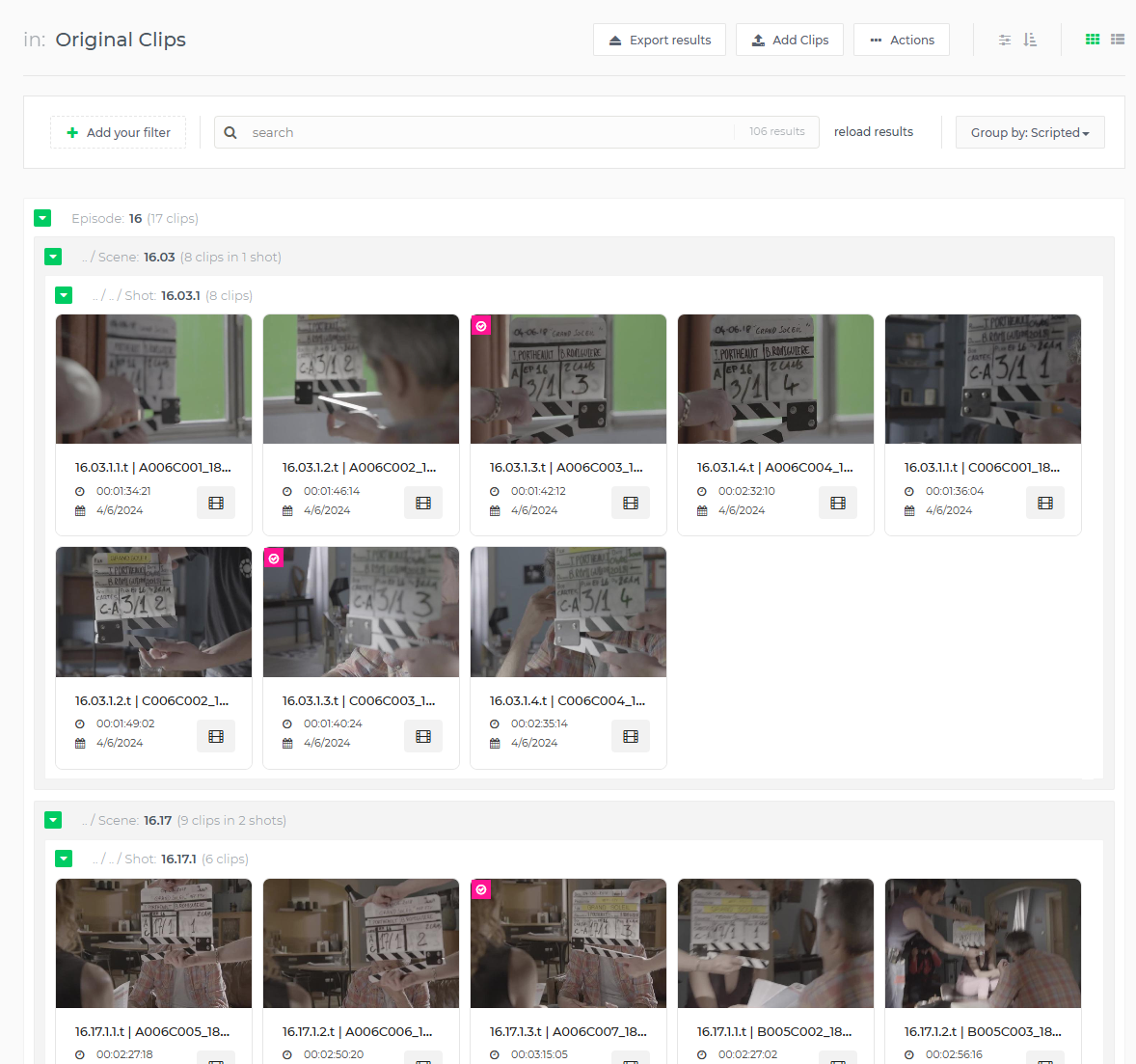
The Limecraft Flow user interface listing material will always group by MediaObject, as discussed in the previous section. However, it also allows to group by other (clip-level) fields.
The screenshot below shows the Flow UI clip listing, grouped by Episode, then by Scene, then by Shot:
Get available groupings
The user can configure the available groupings themselves. They are stored in the libraryGroupings workspace setting. To learn how to get workspace (production) settings, see this page.
{
	libraryGroupings: [
		{
			label: “Fiction”,
			fields: [“episode”, “scene”, “shot”]
		},
		{
			// .. other config ..
		}
	]
}
List groups at a certain level
The Limecraft Flow UI will list a tree hierarchy of groups and clips within them (see previous screenshot).
We will focus first on getting the available groups at one particular level. This assumes the user gets a screen listing e.g. the episodes, then the user selects one, then they get a screen listing the scenes within that episode and so on.
We have got to know the call already in the section on List filter values (faceting). Just use the same call, setting the fq filter queries to what was selected up until know (e.g. fq=episode:123&fq=scene:456). Request the facet.field on the field you want a listing for, e.g. shot.
List groups at multiple levels
Now we’ll look at the call to get a tree of groupings, giving us e.g. the episodes, and for each episode the scenes in them (that have search results).
This time, we won’t use the facet.field parameter, but rather the facet.pivot parameter:
facet.pivot=episode,scene
The response of this call would be like the example below, from which we can see that our search results appear in 2 episodes. In the first episode “18”, there are search results in scenes “18.16” and “18.02”. In the second episode “20”, there are search results in scenes “20.20” and “20.17”.
{
	…
     // instead of facetFields array, we get facetPivot object
	facetPivot: {
		{
			“episode,scene”: [
				{
					“count”:30,
					“field”:”episode”,
					“value”:”18”,
					“pivot”: [
						{
							“count”:20,
							“field”:”scene”,
							“value”:”18.16”
						},
						{
							“count”:10,
							“field”:”scene”,
							“value”:”18.02”
						},
					]
				},
				{
					“count”:26,
					“field”:”episode”,
					“value”:”20”,
					“pivot”: [
						{
							“count”:16,
							“field”:”scene”,
							“value”:”20.20”
						},
						{
							“count”:10,
							“field”:”scene”,
							“value”:”20.17”
						},
					]
				}
			]
		},
	}
}
Creating and removing annotations on a MediaObject
Create a ClipAnnotation (subclip or comment)
The ClipAnnotation is used in Limecraft Flow UI for representing a subclip (when funnel is ClipAnnotation) or a comment (when funnel is ReviewComment).
To create a ClipAnnotation, use the following call:
POST /production/{prId}/mo/{moId}/{type}Create a new subclip annotation.
Details
Description
It is possible to work with paging by specifying the offset parameter, and instructing the query to begin displaying results from this offset.
Parameters
Path Parameters
| Name | Description | Required | Type |
|---|---|---|---|
|
String type. Clip or comment. |
✔ |
String |
|
ID of the production. |
✔ |
Long |
|
ID of the mediaObject. |
✔ |
Long |
Body Parameters
| Name | Description | Required | Type |
|---|---|---|---|
|
✘ |
Object |
body
Field Name |
Required |
Type |
Description |
Format |
Return Type
ClipAnnotation
| Field Name | Required | Type | Description | Format |
|---|---|---|---|---|
annotationProductionId |
✘ |
Long |
int64 |
|
clipMetadata |
✘ |
ClipMetadata |
||
created |
✘ |
Date |
The time when this resource was created |
date-time |
createdBy |
✘ |
String |
The request or process that created this resource |
|
createdByShareId |
✘ |
Long |
int64 |
|
createdBySharedUserId |
✘ |
Long |
int64 |
|
creatorId |
✘ |
Long |
The id of the user who created this resource |
int64 |
crossProduction |
✘ |
Boolean |
||
customFields |
✘ |
CustomFields |
||
deleted |
✘ |
Date |
date-time |
|
description |
✘ |
String |
Textual contents of the Annotation |
|
end |
✘ |
Long |
The frame range described by the annotation runs up to end, but not including it. Should be less than or equal to the amount of frames the MediaObject has. |
int64 |
funnel |
✘ |
String |
Describes how the Annotation should be interpreted by the client application. Can be thought of as a subtype. |
|
id |
✔ |
Long |
The id of this resource |
int64 |
ignoreTimecode |
✘ |
Boolean |
||
includeTranslatedTo |
✘ |
Boolean |
||
includesFrom |
✘ |
Set of string |
||
keyframeFrames |
✘ |
Long |
int64 |
|
label |
✘ |
String |
||
language |
✘ |
String |
||
lastUpdated |
✘ |
Date |
The time when this resource was last updated |
date-time |
markForUnrestricted |
✘ |
Boolean |
||
mediaObject |
✘ |
MediaObject |
||
mediaObjectId |
✘ |
Long |
int64 |
|
modifiedBy |
✔ |
String |
The request or process responsible for the last update of this resource |
|
name |
✘ |
String |
||
objectType |
✘ |
String |
The data model type or class name of this resource |
|
origin |
✘ |
String |
||
productionId |
✘ |
Long |
int64 |
|
rating |
✘ |
Double |
double |
|
relatedToId |
✘ |
Long |
int64 |
|
securityClasses |
✘ |
Set of string |
Enum: |
|
source |
✘ |
String |
||
spatial |
✘ |
String |
Link the Annotation to a specific part of the video or image frame. A Media Fragments Spatial Dimension description string is expected. |
|
start |
✘ |
Long |
First frame of the Annotation. 0 is the first frame of the clip. The start frame is included in the frame range the annotation describes. |
int64 |
systemFields |
✘ |
CustomFields |
||
tags |
✘ |
Set of string |
||
topics |
✘ |
Set of string |
||
translatedFromId |
✘ |
Long |
int64 |
|
translatedToIds |
✘ |
Set of long |
int64 |
|
uiLocation |
✘ |
String |
||
version |
✔ |
Long |
The version of this resource, used for Optimistic Locking |
int64 |
Content Type
-
application/json
Responses
| Code | Description | Datatype |
|---|---|---|
201 |
The request was successful. |
|
403 |
User needs LOG_EDIT rights. |
|
404 |
The production or MediaObject was not found. |
|
422 |
The comment does not validate to the annotation restriction. For example annotation.start > annotation.end. |
|
To create a ClipAnnotation which ends up in Limecraft Flow UI as a subclip, you could put something like this in the call’s body:
{
    "start": 69,
    "end": 132,
    "description": "Construction workers on the road",
    "funnel": "ClipAnnotation",
    "objectType": "ClipAnnotation"
}
To create a ClipAnnotation which ends up in Limecraft Flow UI as a review comment, you could put something like this in the call’s body:
{
    "start": 132,
    "end": 133,
    "description": "The colors are incorrect here",
    "funnel": "ReviewComment",
    "objectType": "ClipAnnotation",
    "spatial": "xywh=percent:28.1,25.1,1,1",
    "uiLocation": "xywh=percent:46.8,37.3,1,1"
}
There is also a page with more information on Limecraft Flow’s Review feature here.
Removing an annotation
The endpoints to remove an annotation can be used for two things:
-
Remove an individual, non-
MediaObjectAnnotationannotation -
Remove a
MediaObjectAnnotation, which will result in theMediaObjectalso to be removed
Removing the MediaObjectAnnotation of a clip corresponds to removing the clip!
|
Single Remove
DELETE /production/{prId}/an/{id}__
Details
Description
Parameters
Path Parameters
| Name | Description | Required | Type |
|---|---|---|---|
|
✔ |
Long |
|
|
✔ |
Long |
Query Parameters
| Name | Description | Required | Type |
|---|---|---|---|
|
✘ |
Boolean |
|
|
✘ |
Boolean |
Return Type
Annotation
| Field Name | Required | Type | Description | Format |
|---|---|---|---|---|
annotationProductionId |
✘ |
Long |
int64 |
|
clipMetadata |
✘ |
ClipMetadata |
||
created |
✘ |
Date |
The time when this resource was created |
date-time |
createdBy |
✘ |
String |
The request or process that created this resource |
|
createdByShareId |
✘ |
Long |
int64 |
|
createdBySharedUserId |
✘ |
Long |
int64 |
|
creatorId |
✘ |
Long |
The id of the user who created this resource |
int64 |
crossProduction |
✘ |
Boolean |
||
customFields |
✘ |
CustomFields |
||
deleted |
✘ |
Date |
date-time |
|
description |
✘ |
String |
Textual contents of the Annotation |
|
end |
✘ |
Long |
The frame range described by the annotation runs up to end, but not including it. Should be less than or equal to the amount of frames the MediaObject has. |
int64 |
funnel |
✘ |
String |
Describes how the Annotation should be interpreted by the client application. Can be thought of as a subtype. |
|
id |
✔ |
Long |
The id of this resource |
int64 |
includeTranslatedTo |
✘ |
Boolean |
||
includesFrom |
✘ |
Set of string |
||
keyframeFrames |
✘ |
Long |
int64 |
|
label |
✘ |
String |
||
language |
✘ |
String |
||
lastUpdated |
✘ |
Date |
The time when this resource was last updated |
date-time |
mediaObject |
✘ |
MediaObject |
||
mediaObjectId |
✘ |
Long |
int64 |
|
modifiedBy |
✔ |
String |
The request or process responsible for the last update of this resource |
|
objectType |
✘ |
String |
The data model type or class name of this resource |
|
origin |
✘ |
String |
||
productionId |
✘ |
Long |
int64 |
|
rating |
✘ |
Double |
double |
|
relatedToId |
✘ |
Long |
int64 |
|
securityClasses |
✘ |
Set of string |
Enum: |
|
source |
✘ |
String |
||
spatial |
✘ |
String |
Link the Annotation to a specific part of the video or image frame. A Media Fragments Spatial Dimension description string is expected. |
|
start |
✘ |
Long |
First frame of the Annotation. 0 is the first frame of the clip. The start frame is included in the frame range the annotation describes. |
int64 |
systemFields |
✘ |
CustomFields |
||
tags |
✘ |
Set of string |
||
translatedFromId |
✘ |
Long |
int64 |
|
translatedToIds |
✘ |
Set of long |
int64 |
|
version |
✔ |
Long |
The version of this resource, used for Optimistic Locking |
int64 |
Content Type
-
application/json
Responses
| Code | Description | Datatype |
|---|---|---|
0 |
default response |
|
If the annotation is attached to an EditorialObject, it is necessary to add a detachAssemble=true query parameter to the delete call.
Bulk Remove
The above explained how to remove a single annotation. When removing multiple annotations, or when removing a MediaObjectAnnotation, we advise to use the bulk endpoint instead.
POST /production/{prId}/an/bulk_workflow__
Details
Description
Parameters
Path Parameters
| Name | Description | Required | Type |
|---|---|---|---|
|
✔ |
Long |
Body Parameters
| Name | Description | Required | Type |
|---|---|---|---|
|
✘ |
AnnotationBulkRequest |
AnnotationBulkRequest
| Field Name | Required | Type | Description | Format |
|---|---|---|---|---|
actions |
✘ |
List of BulkOperationAction |
||
parameters |
✘ |
Object |
||
waitForIndex |
✘ |
Boolean |
||
workflowLabel |
✘ |
String |
Return Type
✘
Content Type
-
application/json
Responses
| Code | Description | Datatype |
|---|---|---|
0 |
default response |
`` |
The body of this call looks like this:
{
    "actions": [
        {
            "ids": [
                // annotation ids
                8233958
            ],
            "action": "DELETE",
            "options": {
                "deleteAssemble": true,
                "detachStoryPart": true
            }
        }
    ],
    "workflowLabel": "Delete Clips",
    // set to true if you want the search index to be up-to-date
    // after the workflow completes
    "waitForIndex": false
}
The execution of the bulk delete process is modeled as any other Limecraft Flow platform workflow, like the other enrichment and media processing workflows in our system. As such, the workflow API can be used to track its progress, till completion or failure.
The id of the workflow is returned in the response of the above call as the workflowId field.
{
    "created": 1756373460268,
    "errorReports": [],
    "label": "Delete Clips",
    "workflowId": "b90ea064-b419-4e06-84a7-1fa7c726a063",
    ...
}