Categories and Collections
In this section we discuss the usage of the Category and the EditorialObject. These represents a way of organising your workspace into logical units such as shooting days, episodes, topics, customers, etc.
There are many different types of EditorialObject. Learn more about the different types here.
Manage EditorialObjects
Create an EditorialObject
To create an EditorialObject, use the following call.
POST /production/{prId}/eoThis call is being used across the system for for generating different entities, within a specific production.
Details
Description
Based on the body of the request, it can be used for creating a notebook, draft, story, story part, episode or a scene.
Parameters
Path Parameters
| Name | Description | Required | Type |
|---|---|---|---|
|
ID of the production. |
✔ |
Long |
Body Parameters
| Name | Description | Required | Type |
|---|---|---|---|
|
Body of the request. |
✘ |
Object |
body
Field Name |
Required |
Type |
Description |
Format |
Return Type
EditorialObject
The EditorialObject this request is for.
| Field Name | Required | Type | Description | Format |
|---|---|---|---|---|
abstract |
✘ |
String |
||
alternativeTitle |
✘ |
String |
Can contain a second title (with the title field being the primary title) |
|
category |
✘ |
category |
||
categoryId |
✘ |
Long |
The id of the category we belong to |
int64 |
categoryName |
✘ |
String |
||
created |
✘ |
Date |
The time when this resource was created |
date-time |
createdBy |
✘ |
String |
The request or process that created this resource |
|
creatorId |
✘ |
Long |
The id of the user who created this resource |
int64 |
customFields |
✘ |
CustomFields |
||
description |
✘ |
String |
Plain text description |
|
extent |
✘ |
String |
||
funnel |
✘ |
String |
Field which can be interpreted as a subtype (besides objectType). Only the objectType determines the structure of the EditorialObject, the funnel does not. It is meant for applications to indicate the EditorialObject is to be interpreted in a specific way. |
|
id |
✔ |
Long |
The id of this resource |
int64 |
lastUpdated |
✘ |
Date |
The time when this resource was last updated |
date-time |
modifiedBy |
✔ |
String |
The request or process responsible for the last update of this resource |
|
objectType |
✘ |
String |
The data model type or class name of this resource |
|
parent |
✘ |
parent |
||
parentId |
✘ |
Long |
The id of the parent EditorialObject |
int64 |
productionId |
✘ |
Long |
int64 |
|
status |
✘ |
String |
Status of the EditorialObject. Application-specific implementation. |
|
subObjects_index |
✘ |
Integer |
Order of this EditorialObject inside its parent. Gaps are allowed. |
int32 |
systemFields |
✘ |
CustomFields |
||
title |
✘ |
String |
Contains the primary title of the EditorialObject. |
|
version |
✔ |
Long |
The version of this resource, used for Optimistic Locking |
int64 |
Content Type
-
application/json
Responses
| Code | Description | Datatype |
|---|---|---|
201 |
The request was successful new editorial object was created. |
|
403 |
The user needs rights depending on the type of editorial object. Notebook needs COLLECTION_BUILDER_EDIT rights, Episode needs SCREENPLAY_BUILDER_EDIT rights, Story needs STORY_BUILDER_EDIT rights. |
|
404 |
The production was not found. |
|
The body of the call’s objectType (and optionally funnel) will determine what kind of EditorialObject is created.
Besides an objectType, we typically always give the EditorialObject at least a title.
So, to create a Notebook, the body would look like:
{
    "objectType": "Notebook",
    "title": "My First collection group"
}Create a child EditorialObject
Some EditorialObjects can be the child of others. The objectType determines if an EditorialObject can be a child of another or not:
-
When the
objectTypeis just EditorialObject, it can be a child of another EditorialObject.
To create an EditorialObject which is the child of another EditorialObject, pass the id of the parent as parentId in the body of the call:
{
    "objectType": "Draft",
    "title": "My First Subcollection",
    "parentId": {{notebookId}}
}
Create an EditorialObject in a specific Category
To create an EditorialObject in a particular Category, you can provide the categoryId in the body of the call:
{
    "objectType": "Notebook",
    "title": "My First collection group",
    "categoryId": {{categoryId}}
}
If no categoryId is provided, the objectType will determine which Category the EditorialObject is created in. Learn more here.
Remove an EditorialObject
DELETE /production/{prId}/eo/{id}Query for removing a collection.
Details
Description
If the collection has attached material, you will need to add deleteAssemble=true for the call to succeed.
Parameters
Path Parameters
| Name | Description | Required | Type |
|---|---|---|---|
|
ID of the production. |
✔ |
Long |
|
ID of the editorial object. |
✔ |
Long |
Return Type
EditorialObject
The EditorialObject this request is for.
| Field Name | Required | Type | Description | Format |
|---|---|---|---|---|
abstract |
✘ |
String |
||
alternativeTitle |
✘ |
String |
Can contain a second title (with the title field being the primary title) |
|
category |
✘ |
category |
||
categoryId |
✘ |
Long |
The id of the category we belong to |
int64 |
categoryName |
✘ |
String |
||
created |
✘ |
Date |
The time when this resource was created |
date-time |
createdBy |
✘ |
String |
The request or process that created this resource |
|
creatorId |
✘ |
Long |
The id of the user who created this resource |
int64 |
customFields |
✘ |
CustomFields |
||
description |
✘ |
String |
Plain text description |
|
extent |
✘ |
String |
||
funnel |
✘ |
String |
Field which can be interpreted as a subtype (besides objectType). Only the objectType determines the structure of the EditorialObject, the funnel does not. It is meant for applications to indicate the EditorialObject is to be interpreted in a specific way. |
|
id |
✔ |
Long |
The id of this resource |
int64 |
lastUpdated |
✘ |
Date |
The time when this resource was last updated |
date-time |
modifiedBy |
✔ |
String |
The request or process responsible for the last update of this resource |
|
objectType |
✘ |
String |
The data model type or class name of this resource |
|
parent |
✘ |
parent |
||
parentId |
✘ |
Long |
The id of the parent EditorialObject |
int64 |
productionId |
✘ |
Long |
int64 |
|
status |
✘ |
String |
Status of the EditorialObject. Application-specific implementation. |
|
subObjects_index |
✘ |
Integer |
Order of this EditorialObject inside its parent. Gaps are allowed. |
int32 |
systemFields |
✘ |
CustomFields |
||
title |
✘ |
String |
Contains the primary title of the EditorialObject. |
|
version |
✔ |
Long |
The version of this resource, used for Optimistic Locking |
int64 |
Content Type
-
application/json
Responses
| Code | Description | Datatype |
|---|---|---|
200 |
The request was successful. |
|
403 |
The user needs rights depending on the type of editorial object. Notebook needs COLLECTION_BUILDER_EDIT rights, Episode needs SCREENPLAY_BUILDER_EDIT rights, Story needs STORY_BUILDER_EDIT rights. |
|
404 |
The production or editorial object was not found. |
|
For legacy reasons, it is necessary to add the query parameter
deleteAssemble=true parameter to the call, or it won’t succeed.
For example:
{baseUrl}/production/\{prId}/eo/\{Id}?deleteAssemble=true
Patch an EditorialObject
To change particular properties of an Editorial Object, use JSON Patch.
PATCH /production/{prId}/eo/{id}Adjust the collection using a RFC6902-compliant PATCH action. This allows changing only particular properties of the collection while leaving the other properties intact.
Details
Description
Parameters
Path Parameters
| Name | Description | Required | Type |
|---|---|---|---|
|
ID of the production. |
✔ |
Long |
|
ID of the collection. |
✔ |
Long |
Body Parameters
| Name | Description | Required | Type |
|---|---|---|---|
|
✘ |
Object |
body
Field Name |
Required |
Type |
Description |
Format |
Query Parameters
| Name | Description | Required | Type |
|---|---|---|---|
|
Version number used to verify the optimistic lock. Not required, but highly advisable parameter. Leaving it out will disable optimistic locking and you could overwrite other people’s changes. |
✘ |
Long |
Return Type
MaterialInstance
| Field Name | Required | Type | Description | Format |
|---|---|---|---|---|
alternateBackupLocation |
✘ |
String |
||
alternateBackupMetadata |
✘ |
Object |
||
alternateBackupType |
✘ |
String |
||
archive1Location |
✘ |
String |
||
archive1Metadata |
✘ |
Object |
||
archive1Type |
✘ |
String |
||
archive2Location |
✘ |
String |
||
archive2Metadata |
✘ |
Object |
||
archive2Type |
✘ |
String |
||
archive3Location |
✘ |
String |
||
archive3Metadata |
✘ |
Object |
||
archive3Type |
✘ |
String |
||
backupCompleted |
✘ |
Date |
date-time |
|
backupStarted |
✘ |
Date |
date-time |
|
businessKey |
✘ |
String |
||
created |
✘ |
Date |
The time when this resource was created |
date-time |
createdBy |
✘ |
String |
The request or process that created this resource |
|
creatorId |
✘ |
Long |
The id of the user who created this resource |
int64 |
deleted |
✘ |
Boolean |
||
deletedTimestamp |
✘ |
Date |
date-time |
|
filename |
✘ |
String |
||
fingerprints |
✘ |
Set of string |
||
growing |
✘ |
Boolean |
||
id |
✔ |
Long |
The id of this resource |
int64 |
lastUpdated |
✘ |
Date |
The time when this resource was last updated |
date-time |
location |
✘ |
String |
||
locationMetadata |
✘ |
Object |
||
md5 |
✘ |
String |
||
md5Partials |
✘ |
String |
||
md5VerificationCompleted |
✘ |
Date |
date-time |
|
md5VerificationStatus |
✘ |
String |
Enum: NOT_VERIFIED, VERIFIED, REJECTED, |
|
mediaObjectId |
✘ |
Long |
int64 |
|
mediaObjectType |
✘ |
String |
Enum: IMAGE, DOCUMENT, PENDING, AUDIO, VIDEO, SNIPPET, PACKAGE, |
|
metadata |
✘ |
Boolean |
||
modifiedBy |
✔ |
String |
The request or process responsible for the last update of this resource |
|
moiType |
✘ |
String |
Enum: RAW, PROXY, EDL, SHOTSTITCH, STITCH, THUMB, THUMB_SHOT, THUMB_SIXTY, WAVEFORM, AUDIO_MONO, AUDIO_SPEECH, VOLDEMORT_XML, ATTACHMENT, HDR_PROXY, MEZZANINE_PROXY, |
|
mxfReport |
✘ |
Boolean |
||
objectType |
✘ |
String |
The data model type or class name of this resource |
|
onAlternateBackup |
✘ |
Boolean |
||
onAlternateBackupTimestamp |
✘ |
Date |
date-time |
|
onArchive1 |
✘ |
Boolean |
||
onArchive1Timestamp |
✘ |
Date |
date-time |
|
onArchive2 |
✘ |
Boolean |
||
onArchive2Timestamp |
✘ |
Date |
date-time |
|
onArchive3 |
✘ |
Boolean |
||
onArchive3Timestamp |
✘ |
Date |
date-time |
|
onBackup |
✘ |
Boolean |
||
onBackupTimestamp |
✘ |
Date |
date-time |
|
onFlow |
✘ |
Boolean |
||
onFlowTimestamp |
✘ |
Date |
date-time |
|
onsite |
✘ |
Boolean |
||
pathOnCard |
✘ |
String |
||
pattern |
✘ |
String |
||
productionId |
✘ |
Long |
int64 |
|
removeFromQuota |
✘ |
Boolean |
||
shouldBeOnAlternateBackup |
✘ |
Boolean |
||
shouldBeOnAlternateBackupTimestamp |
✘ |
Date |
date-time |
|
shouldBeOnBackup |
✘ |
Boolean |
||
shouldBeOnBackupTimestamp |
✘ |
Date |
date-time |
|
shouldBeOnFlow |
✘ |
Boolean |
||
shouldBeOnFlowTimestamp |
✘ |
Date |
date-time |
|
size |
✘ |
Long |
int64 |
|
tracks |
✘ |
Set of Track |
||
transferDetails |
✘ |
TransferDetails |
||
uid |
✘ |
String |
||
uploading |
✘ |
Boolean |
||
version |
✔ |
Long |
The version of this resource, used for Optimistic Locking |
int64 |
volumeLocations |
✘ |
List of VolumeLocation |
||
zone |
✘ |
String |
Content Type
-
application/json
Responses
| Code | Description | Datatype |
|---|---|---|
200 |
The request was successful. |
|
403 |
The user needs rights depending on the type of editorial object. Notebook needs COLLECTION_BUILDER_EDIT rights, Episode needs SCREENPLAY_BUILDER_EDIT rights, Story needs STORY_BUILDER_EDIT rights. |
|
404 |
The production, media object or material instance was not found. |
|
409 |
The version in the update object does not match with the version stored causing an optimistic lock. |
|
Body example:
{
  "patch": [
    {
      "op": "add",
      "path": "/customFields/MyCustomField",
      "value": {
        "value": "MyCustomFieldValue",
        "label": "The label of this custom field"
      }
    }
  ]
}
Listing and searching EditorialObjects
GET /production/{prId}/eoThe call for querying available collections attached to the production.
Details
Description
On success, a list of available collections for a specific production is returned.
Parameters
Path Parameters
| Name | Description | Required | Type |
|---|---|---|---|
|
ID of the production. |
✔ |
Long |
Query Parameters
| Name | Description | Required | Type |
|---|---|---|---|
|
Use this parameter to adjust the value of the return object. Meaning, you can set the properties you wish to retrieve in order to keep the response succinct. For example includeProperties=title,sceneHeading,version,status. |
✘ |
List of String |
Return Type
String
Content Type
-
application/json
Responses
| Code | Description | Datatype |
|---|---|---|
200 |
The request was successful. |
|
403 |
The user needs PRODUCTION_VIEW rights. |
|
404 |
The production was not found. |
|
| As for all listing calls, Paging is supported. |
The result of the above call will be a list of EditorialObjects.
Filter
EditorialObjects can be queried by means of filter query fq parameters. The following are supported:
| Query parameter | Description |
|---|---|
|
filter by type (Notebook, Draft, Episode, Scene, Story, StoryPart) |
|
filter by funnel |
|
filter by title or the use the case-insensitive variant |
|
filter by customFields |
|
filter by systemFields |
|
filter collections with a given status (NORMAL, ACTIVE, ARCHIVED, DELETED) |
|
filter collections within a specific category |
|
filter by production id |
|
filter by account id |
|
filter collections which are child of the given parent collection id |
Categories
Categories give you sections to divide your workspace into. All EditorialObjects belong to exactly one Category.
Learn more about the different types of category here.
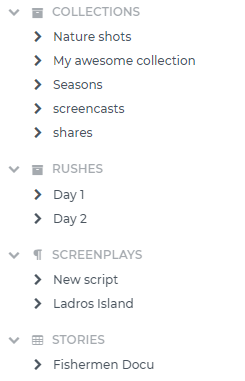
The image below shows a Limecraft Flow UI Library sidebar with (in order of appearance) the DEFAULT_NOTEBOOK (labelled 'Collections'), a USER_DEFINED category called 'Rushes', the DEFAULT_EPISODE (labelled 'Screenplays`) and the DEFAULT_STORY (labelled Stories).
List the available categories
GET /production/{prId}/categoryQuery for getting a list of all available categories attached to the production.
Details
Description
On success, a list of existing categories for a specific production is returned.
Parameters
Path Parameters
| Name | Description | Required | Type |
|---|---|---|---|
|
ID of the production. |
✔ |
Long |
Query Parameters
| Name | Description | Required | Type |
|---|---|---|---|
|
Query parameter to filter the response e.g.: fq=type:(UNASSIGNED USER_DEFINED DEFAULT_NOTEBOOK DEFAULT_EPISODE DEFAULT_STORY) . |
✘ |
List of String |
Return Type
Category
The category we belong to
| Field Name | Required | Type | Description | Format |
|---|---|---|---|---|
created |
✘ |
Date |
The time when this resource was created |
date-time |
createdBy |
✘ |
String |
The request or process that created this resource |
|
creatorId |
✘ |
Long |
The id of the user who created this resource |
int64 |
description |
✘ |
String |
||
id |
✔ |
Long |
The id of this resource |
int64 |
includeRoles |
✘ |
Boolean |
||
index |
✘ |
Integer |
int32 |
|
label |
✘ |
String |
||
lastUpdated |
✘ |
Date |
The time when this resource was last updated |
date-time |
modifiedBy |
✔ |
String |
The request or process responsible for the last update of this resource |
|
name |
✘ |
String |
||
objectType |
✘ |
String |
The data model type or class name of this resource |
|
productionId |
✘ |
Long |
int64 |
|
roles |
✘ |
Set of Role |
||
type |
✘ |
String |
Enum: UNASSIGNED, USER_DEFINED, DEFAULT_NOTEBOOK, DEFAULT_EPISODE, DEFAULT_STORY, |
|
version |
✔ |
Long |
The version of this resource, used for Optimistic Locking |
int64 |
Content Type
-
application/json
Responses
| Code | Description | Datatype |
|---|---|---|
200 |
The request was successful. |
|
403 |
The user needs PRODUCTION_VIEW rights. |
|
404 |
The production was not found. |
|
Attach clips to an EditorialObject
An important aspect of an EditorialObject is that we can attach clips to it. At the moment we only support attaching clips to leaf-collections (an EditorialObject without children).
Attach a clip
To attach one or more Annotations to the EditorialObject, use the following call:
POST /production/{prId}/eo/{id}/attachQuery for attaching a clip to the collection.
Details
Description
We expect the id(s) of the media object annotations in the request body.
Parameters
Path Parameters
| Name | Description | Required | Type |
|---|---|---|---|
|
ID of the production. |
✔ |
Long |
|
ID of the collection. |
✔ |
Long |
Body Parameters
| Name | Description | Required | Type |
|---|---|---|---|
|
IDs of one or more media object annotations to be attached. |
✘ |
List of long |
long
The Long class wraps a value of the primitive type long in an object. An object of type Long contains a single field whose type is long.
Return Type
EditorialObject
The EditorialObject this request is for.
| Field Name | Required | Type | Description | Format |
|---|---|---|---|---|
abstract |
✘ |
String |
||
alternativeTitle |
✘ |
String |
Can contain a second title (with the title field being the primary title) |
|
category |
✘ |
category |
||
categoryId |
✘ |
Long |
The id of the category we belong to |
int64 |
categoryName |
✘ |
String |
||
created |
✘ |
Date |
The time when this resource was created |
date-time |
createdBy |
✘ |
String |
The request or process that created this resource |
|
creatorId |
✘ |
Long |
The id of the user who created this resource |
int64 |
customFields |
✘ |
CustomFields |
||
description |
✘ |
String |
Plain text description |
|
extent |
✘ |
String |
||
funnel |
✘ |
String |
Field which can be interpreted as a subtype (besides objectType). Only the objectType determines the structure of the EditorialObject, the funnel does not. It is meant for applications to indicate the EditorialObject is to be interpreted in a specific way. |
|
id |
✔ |
Long |
The id of this resource |
int64 |
lastUpdated |
✘ |
Date |
The time when this resource was last updated |
date-time |
modifiedBy |
✔ |
String |
The request or process responsible for the last update of this resource |
|
objectType |
✘ |
String |
The data model type or class name of this resource |
|
parent |
✘ |
parent |
||
parentId |
✘ |
Long |
The id of the parent EditorialObject |
int64 |
productionId |
✘ |
Long |
int64 |
|
status |
✘ |
String |
Status of the EditorialObject. Application-specific implementation. |
|
subObjects_index |
✘ |
Integer |
Order of this EditorialObject inside its parent. Gaps are allowed. |
int32 |
systemFields |
✘ |
CustomFields |
||
title |
✘ |
String |
Contains the primary title of the EditorialObject. |
|
version |
✔ |
Long |
The version of this resource, used for Optimistic Locking |
int64 |
Content Type
-
application/json
Responses
| Code | Description | Datatype |
|---|---|---|
200 |
The request was successful. |
|
403 |
The user needs PRODUCTION_VIEW rights and the collection needs VIEW rights. |
|
404 |
The production or editorial object was not found. |
|
The body of the call should be a list of Annotation ids:
[12093, 93903]After attaching an Annotation to an EditorialObject, the Annotations in the index will get some additional properties set.
For example, the result of GET /api/production/{productionId}/an/search?q=objectId:{annotationId} will contain among others the following fields related to the attach to an EditorialObject:
{
  "attachedEditorialObjectId": [
    "181445"
  ],
  "clipOrSubclipHasAttachedEditorialObjectId": [
    "181445"
  ],
  "attachedEditorialObjectInfo": [
    "Draft;;181445"
  ],
  "clipOrSubclipHasAttachedEditorialObjectInfo": [
    "Draft;;181445"
  ],
  "attachedEditorialObjectParentId": [
    181439
  ],
  "clipOrSubclipHasAttachedEditorialObjectParentId": [
    181439
  ],
  "clipHasAttachedEditorialObjectId": [
    "181445"
  ],
  "clipHasAttachedEditorialObjectInfo": [
    "Draft;;181445"
  ],
  "clipHasAttachedEditorialObjectParentId": [
    181439
  ],
  "attachedEditorialObject": [
    "Draft_181445_My Very First Draft"
  ]
}
Detach a clip
POST /production/{prId}/eo/{id}/detachQuery for detaching the from the collection.
Details
Description
We expect the id(s) of the media object annotations in the request body.
Parameters
Path Parameters
| Name | Description | Required | Type |
|---|---|---|---|
|
ID of the production. |
✔ |
Long |
|
ID of the collection. |
✔ |
Long |
Body Parameters
| Name | Description | Required | Type |
|---|---|---|---|
|
IDs of one or more media object annotations to be detached. |
✘ |
List of long |
long
The Long class wraps a value of the primitive type long in an object. An object of type Long contains a single field whose type is long.
Return Type
EditorialObject
The EditorialObject this request is for.
| Field Name | Required | Type | Description | Format |
|---|---|---|---|---|
abstract |
✘ |
String |
||
alternativeTitle |
✘ |
String |
Can contain a second title (with the title field being the primary title) |
|
category |
✘ |
category |
||
categoryId |
✘ |
Long |
The id of the category we belong to |
int64 |
categoryName |
✘ |
String |
||
created |
✘ |
Date |
The time when this resource was created |
date-time |
createdBy |
✘ |
String |
The request or process that created this resource |
|
creatorId |
✘ |
Long |
The id of the user who created this resource |
int64 |
customFields |
✘ |
CustomFields |
||
description |
✘ |
String |
Plain text description |
|
extent |
✘ |
String |
||
funnel |
✘ |
String |
Field which can be interpreted as a subtype (besides objectType). Only the objectType determines the structure of the EditorialObject, the funnel does not. It is meant for applications to indicate the EditorialObject is to be interpreted in a specific way. |
|
id |
✔ |
Long |
The id of this resource |
int64 |
lastUpdated |
✘ |
Date |
The time when this resource was last updated |
date-time |
modifiedBy |
✔ |
String |
The request or process responsible for the last update of this resource |
|
objectType |
✘ |
String |
The data model type or class name of this resource |
|
parent |
✘ |
parent |
||
parentId |
✘ |
Long |
The id of the parent EditorialObject |
int64 |
productionId |
✘ |
Long |
int64 |
|
status |
✘ |
String |
Status of the EditorialObject. Application-specific implementation. |
|
subObjects_index |
✘ |
Integer |
Order of this EditorialObject inside its parent. Gaps are allowed. |
int32 |
systemFields |
✘ |
CustomFields |
||
title |
✘ |
String |
Contains the primary title of the EditorialObject. |
|
version |
✔ |
Long |
The version of this resource, used for Optimistic Locking |
int64 |
Content Type
-
application/json
Responses
| Code | Description | Datatype |
|---|---|---|
200 |
The request was successful. |
|
403 |
The user needs PRODUCTION_VIEW rights and the collection needs VIEW rights. |
|
404 |
The production or editorial object was not found. |
|
Moving EditorialObjects around
EditorialObjects can be moved around between parent EditorialObjects or Categories.
Move a root EditorialObject to a different Category
PUT /production/{prId}/eo/{id}/categoryUpdate of collection category is a potential heavy call, so a number of pre-flight checks are performed. When nothing needs to be done, e.g. the category is already at the given id, a 204 response is returned. Note that only the category of a root-collection (Episode, Story, Notebook) can be altered. We expect only the id of the target category in the request body.
Details
Description
If all pre-flight checks pass, a workflow is created and a 202 Accepted is returned with the workflow details in the body. The location header contains the url at which the status of the workflow can be checked.
Parameters
Path Parameters
| Name | Description | Required | Type |
|---|---|---|---|
|
ID of the production. |
✔ |
Long |
|
ID of the collection. |
✔ |
Long |
Body Parameters
| Name | Description | Required | Type |
|---|---|---|---|
|
ID of the new category. |
✔ |
Long |
body
Field Name |
Required |
Type |
Description |
Format |
Return Type
WorkflowMinWrapper
| Field Name | Required | Type | Description | Format |
|---|---|---|---|---|
accountId |
✘ |
Long |
int64 |
|
completed |
✘ |
Long |
int64 |
|
created |
✘ |
Long |
int64 |
|
errorReports |
✘ |
List of TaskReport |
||
href |
✘ |
String |
||
hrefs |
✘ |
Map of Href |
||
id |
✘ |
String |
||
label |
✘ |
String |
||
mediaObjectId |
✘ |
Long |
int64 |
|
mutex1 |
✘ |
Object |
||
objectType |
✘ |
String |
||
productionId |
✘ |
Long |
int64 |
|
publishedFiles |
✘ |
List of object |
||
requiredRights |
✘ |
List of ProductionPermission |
||
serverTime |
✘ |
Date |
date-time |
|
status |
✘ |
String |
Enum: Inited, Started, Completed, Error, Cancelled, Paused, CompletedPending, ErrorPending, WaitForCallback, Scheduled, Skipped, |
|
taskReports |
✘ |
List of TaskReport |
||
tasks |
✘ |
List of TaskAssignmentMinWrapper |
||
userId |
✘ |
Long |
int64 |
|
workflowCompleted |
✘ |
Date |
date-time |
|
workflowFailed |
✘ |
Date |
date-time |
|
workflowId |
✘ |
String |
||
workflowStarted |
✘ |
Date |
date-time |
Content Type
-
application/json
Responses
| Code | Description | Datatype |
|---|---|---|
200 |
The request was successful. |
|
202 |
Accepted. A workflow is created. |
|
204 |
The editorial object is already in the provided category. |
|
403 |
The user needs PRODUCTION_MANAGE rights and the collection needs VIEW rights. |
|
404 |
The production or editorial object was not found. |
|
Move a child EditorialObject to a different parent
PUT /production/{prId}/eo/{id}/parentUpdate of collection parents is a potential heavy call, so a number of pre-flight checks are performed. When nothing needs to be done, e.g. the parent is already at the given id, a 204 response is returned. When validation fails, e.g. the type of the target parent does not matches the current parent, a 400 Bad Request is returned. Note that only the parent of a sub collection (Scene, StoryPart, Draft) can be altered. We expect only the id of the target collection in the request body.
Details
Description
If all pre-flight checks pass, a workflow is created and a 202 Accepted is returned with the workflow details in the body. The location header contains the url at which the status of the workflow can be checked.
Parameters
Path Parameters
| Name | Description | Required | Type |
|---|---|---|---|
|
ID of the production. |
✔ |
Long |
|
ID of the collection. |
✔ |
Long |
Body Parameters
| Name | Description | Required | Type |
|---|---|---|---|
|
ID of the new parent. |
✔ |
Long |
body
Field Name |
Required |
Type |
Description |
Format |
Return Type
EditorialObject
The EditorialObject this request is for.
| Field Name | Required | Type | Description | Format |
|---|---|---|---|---|
abstract |
✘ |
String |
||
alternativeTitle |
✘ |
String |
Can contain a second title (with the title field being the primary title) |
|
category |
✘ |
category |
||
categoryId |
✘ |
Long |
The id of the category we belong to |
int64 |
categoryName |
✘ |
String |
||
created |
✘ |
Date |
The time when this resource was created |
date-time |
createdBy |
✘ |
String |
The request or process that created this resource |
|
creatorId |
✘ |
Long |
The id of the user who created this resource |
int64 |
customFields |
✘ |
CustomFields |
||
description |
✘ |
String |
Plain text description |
|
extent |
✘ |
String |
||
funnel |
✘ |
String |
Field which can be interpreted as a subtype (besides objectType). Only the objectType determines the structure of the EditorialObject, the funnel does not. It is meant for applications to indicate the EditorialObject is to be interpreted in a specific way. |
|
id |
✔ |
Long |
The id of this resource |
int64 |
lastUpdated |
✘ |
Date |
The time when this resource was last updated |
date-time |
modifiedBy |
✔ |
String |
The request or process responsible for the last update of this resource |
|
objectType |
✘ |
String |
The data model type or class name of this resource |
|
parent |
✘ |
parent |
||
parentId |
✘ |
Long |
The id of the parent EditorialObject |
int64 |
productionId |
✘ |
Long |
int64 |
|
status |
✘ |
String |
Status of the EditorialObject. Application-specific implementation. |
|
subObjects_index |
✘ |
Integer |
Order of this EditorialObject inside its parent. Gaps are allowed. |
int32 |
systemFields |
✘ |
CustomFields |
||
title |
✘ |
String |
Contains the primary title of the EditorialObject. |
|
version |
✔ |
Long |
The version of this resource, used for Optimistic Locking |
int64 |
Content Type
-
application/json
Responses
| Code | Description | Datatype |
|---|---|---|
200 |
The request was successful. |
|
202 |
Accepted. A workflow is created. |
|
204 |
The editorial object is already in the provided category. |
|
403 |
The user needs PRODUCTION_MANAGE rights and the collection needs VIEW rights. |
|
404 |
The production or editorial object was not found. |
|
Custom Fields on Editorial Objects
Although Limecraft Flow already has a lot of built-in fields, it is often useful to be able to define your own fields, relevant to your use case.
Custom Fields can be used to attach custom metadata properties to an EditorialObject.
CustomFieldsDescription: Setting up custom fields
The structure and presence of custom fields can be defined and limited by using CustomFieldsDescriptions.
| CustomFields also exist on the Annotation level. That is documented here. |
Each time a custom field is updated or created on an EditorialObject, that field is validated against the CustomFieldsDescription of the production.
Get CustomFieldsDescription
GET /production/{prId}/eocfdThis API call retrieves the custom fields description for collections.
Details
Description
Parameters
Path Parameters
| Name | Description | Required | Type |
|---|---|---|---|
|
✔ |
Long |
Return Type
CustomFieldsDescription
| Field Name | Required | Type | Description | Format |
|---|---|---|---|---|
allowUndefinedFields |
✘ |
Boolean |
||
clientSettings |
✘ |
Object |
||
fields |
✘ |
Map of CustomFieldDescription |
||
name |
✘ |
String |
Content Type
-
application/json
Responses
| Code | Description | Datatype |
|---|---|---|
200 |
The request was successful. |
|
403 |
The user needs PRODUCTION_VIEW rights. |
|
404 |
The production was not found. |
|
Update CustomFieldsDescription
To make changes, save the CustomFieldsDescription.
PUT /production/{prId}/eocfdThis API call sets the custom fields description for collections.
Details
Description
Parameters
Path Parameters
| Name | Description | Required | Type |
|---|---|---|---|
|
✔ |
Long |
Body Parameters
| Name | Description | Required | Type |
|---|---|---|---|
|
✘ |
CustomFieldsDescription |
CustomFieldsDescription
| Field Name | Required | Type | Description | Format |
|---|---|---|---|---|
allowUndefinedFields |
✘ |
Boolean |
||
clientSettings |
✘ |
Object |
||
fields |
✘ |
Map of CustomFieldDescription |
||
name |
✘ |
String |
Return Type
CustomFieldsDescription
| Field Name | Required | Type | Description | Format |
|---|---|---|---|---|
allowUndefinedFields |
✘ |
Boolean |
||
clientSettings |
✘ |
Object |
||
fields |
✘ |
Map of CustomFieldDescription |
||
name |
✘ |
String |
Content Type
-
application/json
Responses
| Code | Description | Datatype |
|---|---|---|
200 |
The request was successful. |
|
403 |
The user needs PRODUCTION_MANAGE rights. |
|
404 |
The production or custom field description was not found. |
|
409 |
The version in the update object does not match with the version stored causing an optimistic lock. |
|
It is possible to update only a single field of the CustomFieldsDescription too:
PUT /production/{prId}/eocfd/{property}__
Details
Description
Parameters
Path Parameters
| Name | Description | Required | Type |
|---|---|---|---|
|
✔ |
Long |
|
|
✔ |
String |
Body Parameters
| Name | Description | Required | Type |
|---|---|---|---|
|
✘ |
CustomFieldDescription |
CustomFieldDescription
| Field Name | Required | Type | Description | Format |
|---|---|---|---|---|
autocompleteExtractor |
✘ |
String |
||
autocompleteUrl |
✘ |
String |
||
blackList |
✘ |
List of string |
||
clientConfig |
✘ |
Object |
||
clipAllowed |
✘ |
Boolean |
||
defaultValue |
✘ |
Object |
||
description |
✘ |
String |
||
hidden |
✘ |
Boolean |
||
label |
✘ |
String |
||
multiValued |
✘ |
Boolean |
||
order |
✘ |
Double |
double |
|
readOnly |
✘ |
Boolean |
||
requiresId |
✘ |
Boolean |
||
restrictedTo |
✘ |
List of string |
||
skipWhiteListValidation |
✘ |
Boolean |
||
subClipAllowed |
✘ |
Boolean |
||
thesaurus |
✘ |
String |
||
type |
✘ |
String |
Enum: STRING, BOOLEAN, INTEGER, DATE, DOUBLE, LONG, JSON, TEXT, FRAME, COMPOUND, FLOW_ID, FLOW_OBJECT, |
|
userProperties |
✘ |
Map of string |
||
validation |
✘ |
String |
||
whiteList |
✘ |
List of string |
Return Type
CustomFieldsDescription
| Field Name | Required | Type | Description | Format |
|---|---|---|---|---|
allowUndefinedFields |
✘ |
Boolean |
||
clientSettings |
✘ |
Object |
||
fields |
✘ |
Map of CustomFieldDescription |
||
name |
✘ |
String |
Content Type
-
application/json
Responses
| Code | Description | Datatype |
|---|---|---|
0 |
default response |
|
Setting the value of a custom field
Once the CustomFieldsDescription is set up, you can start saving values to them.
For setting the value of a customField on a collection, the API call should go to
PATCH /api/production/7238/eo/418368
[
    {
        "op": "add",
        "path": "/customFields/author",
        "value": {
            "type": "STRING",
            "label": "author",
            "multiValued": false,
            "values": [
                "John Irving"
            ]
        }
    }
]